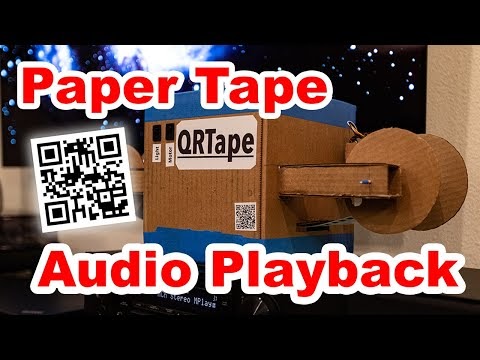
For the past couple of years, I have been intrigued by a novel idea: leveraging modern audio compression and computer vision technologies to store high-fidelity audio on a simple paper tape. Could this unconventional medium rival traditional storage methods?

Reimagining Data Storage: From Magnetic Tape to Paper-Based Media
Tracing the evolution of data storage-from engraved cylinders to magnetic tapes-reveals the persistent challenges of balancing quality, reliability, and cost. Magnetic tape, while revolutionary, demands intricate mechanical systems and sensitive electronics, making it prone to wear and complex maintenance. This inspired me to explore a radically simpler approach that sidesteps these mechanical complexities.
 |
| QRTape: A Paper-Based Audio Storage System |

Introducing QRTape: Paper Tape Meets QR Code Technology
QRTape is a system that encodes data as a sequence of QR codes printed on a continuous paper strip. This strip is mechanically advanced past a webcam using a simple, homemade tape transport constructed primarily from cardboard and paper. The entire setup replaces the complex tape drives of yesteryear with a lightweight, low-cost alternative.
 |
| QRTape Player Prototype |
Hardware Design: Simple Yet Effective
The core hardware challenge was to create a mechanism that smoothly transports the paper tape past a camera for continuous scanning. I built a prototype using everyday materials-cardboard, tape, and hot glue. The tape is wound on spools fashioned from repurposed paper towel cores with cardboard end caps, ensuring a lightweight and cost-effective design.
 |
| Close-up of the QRTape Mechanism |
The tape passes through a scanning chamber where a webcam and a dedicated light source are mounted. A small paper strip acts as a tensioner and flattens the tape, mimicking the function of pinch rollers found in traditional tape players.
 |
| Scanning Stage Inside the QRTape Player |
On the output side, a stepper motor drives the take-up spool via a simple rubber-band belt system, controlled by an Arduino microcontroller. This setup advances the tape at a steady pace, allowing the camera to capture 1-2 QR codes per second reliably.
 |
| Stepper Motor Driving the Take-Up Spool |
Future enhancements could include a tape centering mechanism to minimize lateral movement and dual motors for bidirectional tape control, enabling rewinding and error correction through closed-loop feedback.
Software Architecture: The Heart of QRTape
The software stack is pivotal to QRTape’s success. It integrates several powerful open-source tools to handle barcode scanning and audio compression seamlessly.
At the core is the ZBar library, which efficiently decodes QR codes from the webcam feed. For audio compression, I utilize the Opus codec, renowned for its exceptional quality at low bitrates. For example, Opus can deliver clear stereo audio at just 16 kbps, outperforming older codecs like MP3 in both fidelity and compression efficiency.
Complementing these tools, I developed a custom utility named qrtape, which converts input files into a series of QR codes. Each QR code includes a sequence number and a CRC16 checksum to detect and mitigate errors beyond the QR code’s built-in error correction.
Audio Compression Workflow
To prepare audio for QRTape, the source file is compressed using Opus in variable bitrate (VBR) mode. This approach dynamically adjusts bitrate based on audio complexity, optimizing quality and file size. For instance, a 4-minute 21-second stereo track compressed at 12 kbps VBR results in a remarkably compact 355 kB file.
# Compress FLAC audio to 12kbps VBR stereo Opus
opusenc --discard-comments --discard-pictures --framesize 60 --bitrate 12 equalizer.flac equalizer-12k-stereo-vbr.opus
Segmenting Data into QR-Compatible Chunks
Next, the compressed audio file is divided into uniform chunks sized to fit the maximum data capacity of a QR code with medium error correction (ECC). The qrtape tool handles this segmentation, padding the final chunk if necessary to maintain consistent size, simplifying decoding and reassembly.
# Split file into 2331-byte chunks for QR encoding
qrtape --encode -s 2331 --input equalizer-12k-stereo-vbr.opus -p equalizer_
This process yields 157 binary chunks, each ready to be transformed into a QR code. The chunk size aligns with the largest QR code version (177×177 modules) at medium ECC, balancing data density and error resilience.
Generating QR Codes
Each binary chunk is then encoded into a QR code image using the qrencode utility. The QR codes are generated in binary mode with no border and a large module size to ensure sharp printing and reliable scanning.
# Create QR codes with medium ECC
for i in {0..156}; do
  qrencode -8 -m 0 -s 16 -l M -r equalizer_$i.bin -o equalizer_$i.png
done
Printing the Tape
For printing, I use a Brother QL-700 label printer controlled via the brother_ql Python package, which bypasses traditional print systems for direct control. The QR codes are printed sequentially without cutting, forming a continuous tape. A delay between prints prevents overheating.
# Print QR codes continuously with cooling intervals
for i in {0..156}; do
  echo "Printing code $i"
  sudo brother_ql -b pyusb -m QL-700 -p usb://0x04f9:0x2042 print -l 62 --600dpi --no-cut equalizer_$i.png
  sleep 12
done
Real-Time Playback Pipeline
Playback is achieved through a streamlined command pipeline that captures QR codes from the webcam, decodes them, and streams the audio directly to a media player without intermediate file storage.
# Stream audio playback from live QR code scanning
zbarcam /dev/video0 --prescale=1920x1080 --raw -Sdisable -Sqrcode.enable -Sbinary | ./qrtape/qrtape -d -s 2331 --allow-skip | tee equalizer.opus | mplayer -
This pipeline uses zbarcam to read QR codes from a Logitech C920 webcam, known for its close focusing ability. The qrtape decoder reconstructs the audio stream, tolerating occasional missed codes by skipping them, which manifests as minor audio jumps. The decoded stream is saved to disk for further analysis and simultaneously played back via mplayer.
Reflections and Future Directions
This experiment highlights the creative potential of combining disparate technologies-QR codes, paper media, and modern audio codecs-to create a functional, low-cost audio storage system. While QR codes offer a convenient and widely supported format, they may not be the most data-dense option for this application. Tailored encoding schemes optimized for controlled lighting and camera conditions could significantly boost data throughput and reduce physical tape length.
Enhancements such as improved tape alignment, bidirectional motor control, and closed-loop feedback for error correction could elevate QRTape from a proof-of-concept to a practical archival medium.
Special thanks to collaborators who contributed to the stepper motor design and to the artist Espen Kraft for permission to use the track “Equalizer” as demonstration material.